Delegate · Paperwork.Skill

Ask your AI assistant for a document in plain English.

The Paperwork skill lets your AI assistant make documents for you from a request. It works in Claude Code, Cursor, GitHub Copilot in VS Code and Windsurf, and other assistants that can run commands on your computer. It's for people who would rather ask for a document than build or run one.
Use it when

  • You need a document now and know what should be in it, but not how the template works.
  • You want your assistant to write a first template for you to check.
  • Your assistant fills in the template from the files and systems you've already given it access to.

What you get

Ask in your own words.

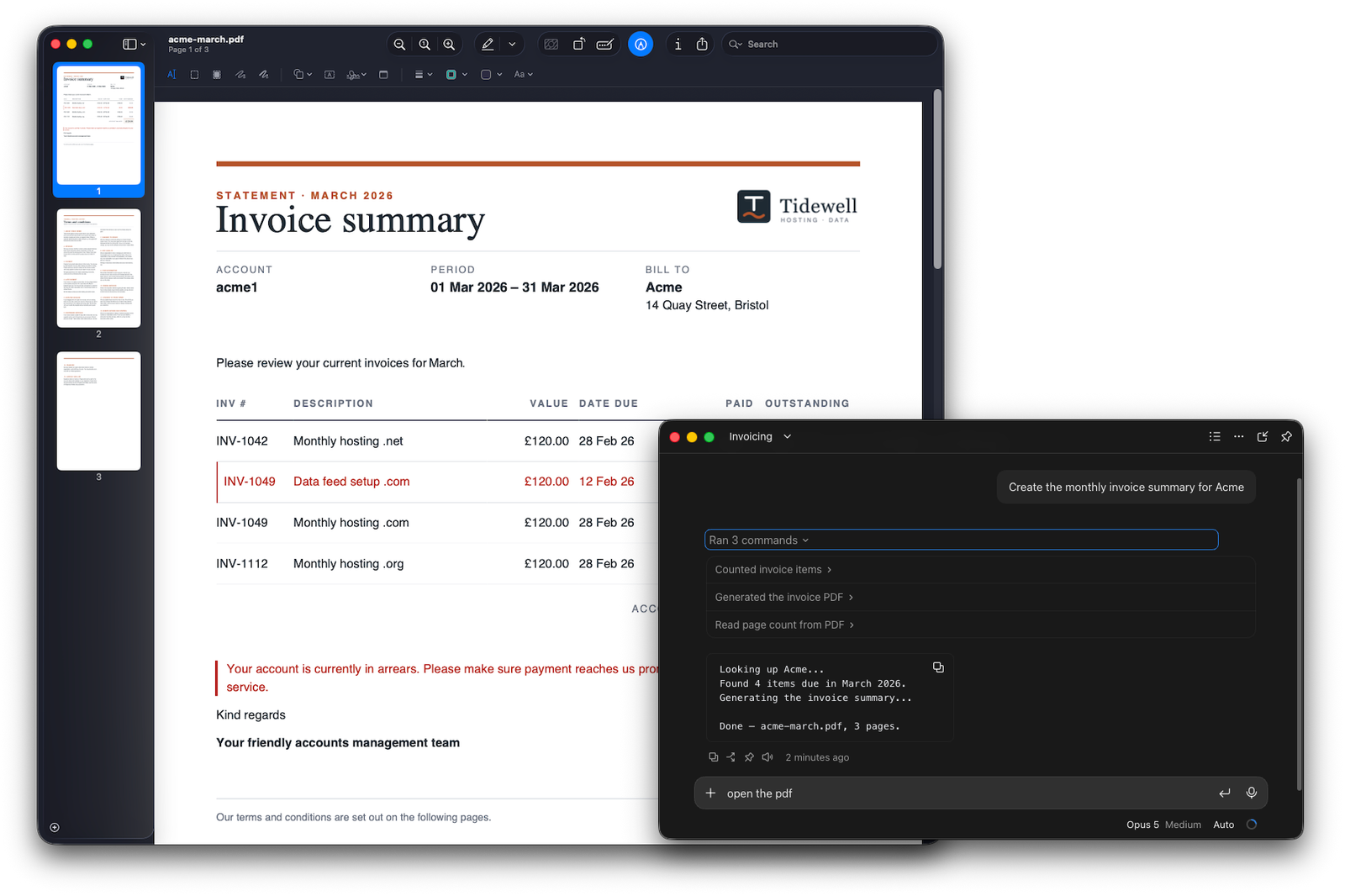
"Make the March invoice for Acme." Your assistant finds the template, fills in the details and makes the PDF.

On your own computer.

The skill runs the Paperwork CLI on your machine, and saves the PDF where you ask.

A first draft of a template.

Describe the document you need, and your assistant writes a template and checks it.

You stay in charge of sending.

Paperwork makes the document. It doesn't send it anywhere.

Works with

How Paperwork works: start a template, shape it in the Designer, keep one template, then share and use it in the Viewer, your AI assistant, the command line or your own apps. 01 CREATE Start a template From something you have, or from nothing 02 DESIGN The Designer Where you create, update and publish your templates 03 KEEP One template Made once, then used for every document 04 USE Share and use it Make the PDF, filled in and ready to read Word documentBring in a .docx Other contentPaste in text you already have A blueprintStart from a ready-made template Blank pageStart from nothing From your AI assistantImport a design it drafted for you PAPERWORK.DESIGN On the pageClick, type and style In codeFull control of every part PreviewSee the real document with your data as you go Check inEvery change you check in is a saved version PublishOne approved version, for everyone who uses it StructureThe sections, pages and layout StylesThe same fonts, colours and spacing every time FieldsThe blanks people fill in DataFrom your own files, a web address you choose,or data your system passes in. PAPERWORK.VIEWEROnline viewerOpen it from a link, or on your website PAPERWORK.SKILLYour AI assistantAsk, and it fills in the fields for you PAPERWORK.CLICommand lineScheduled jobs, pipelines and automation PAPERWORK.COREYour own appsBuilt into software you make
How Paperwork works: start a template, shape it in the Designer, keep one template, then share and use it in the Viewer, your AI assistant, the command line or your own apps. 01 CREATE Start a template From something you have, or from nothing Word documentBring in a .docx Other contentPaste in text you already have A blueprintStart from a ready-made template Blank pageStart from nothing From your AI assistantImport a design it drafted for you 02 DESIGN The Designer Where you create, update and publish your templates PAPERWORK.DESIGN On the pageClick, type and style In codeFull control of every part PreviewSee the real document with your data as you go Check inEvery change you check in is a saved version PublishOne approved version, for everyone who uses it 03 KEEP One template Made once, then used for every document StructureThe sections, pages and layout StylesThe same fonts, colours and spacing every time FieldsThe blanks people fill in DataFrom your own files, a web address you choose,or data your system passes in. 04 USE Share and use it Make the PDF, filled in and ready to read PAPERWORK.VIEWEROnline viewerOpen it from a link, or on your website PAPERWORK.SKILLYour AI assistantAsk, and it fills in the fields for you PAPERWORK.CLICommand lineScheduled jobs, pipelines and automation PAPERWORK.COREYour own appsBuilt into software you make

Next Steps